Finding the best 3D printing pens requires balancing ease of use with extrusion precision, especially as the market splits between kid-safe models and professional-grade tools. My analysis identifies the 3Doodler Flow as the strongest all-around choice for its wireless freedom and refined nozzle control, while the MYNT3D Super stands out for hobbyists needing advanced temperature management. Most buyers struggle with clogging issues and plastic compatibility, so prioritizing models with reliable feed mechanisms and clear user interfaces saves hours of frustration. This guide breaks down the specific tradeoffs between corded reliability and cordless convenience to help you select the right pen for your skill level.

Get art and craft supplies delivered free with Prime
- Fast, free delivery on millions of items
- Prime Video, Amazon Music and more included
- Member-only deals all year
Key Takeaways
- Cordless models like the 3Doodler Flow offer superior freedom of movement but require frequent charging and may lose heat stability during long sessions compared to corded units.
- ABS plastic remains the standard for most pens due to its strength, but PCL (low temperature) filaments are now widely available in kits for younger users, eliminating burn risks.
- OLED screens and digital temperature displays, found on models like the MYNT3D Professional, provide precise control that is critical for preventing jams with mixed material types.
- Bundle value is misleading; buying a pen with a massive filament kit often results in wasted material if the pen’s feed mechanism is inconsistent, so prioritize pen quality over filament quantity.
- Nozzle size dictates detail level: 0.6mm nozzles are standard for general use, but interchangeable nozzle options are rare, making it difficult to switch between fine detail and large fills without buying multiple units.
| 3Doodler Flow 3D Printing Pen with Filaments, Stencil Book, and Guide |  | Best for Material Versatility | Filament compatibility: 1.75 mm PLA, ABS, and wood | Display: Integrated LCD temperature monitor | Included filament: 80 feet total in eight colors | VIEW LATEST PRICE | See Our Full Breakdown |
| SCRIB3D Advanced 3D Printing Pen Bundle with PLA Filament |  | Best for a Large Filament Supply | Filament type: PLA | Filament diameter: 1.75 mm | Total filament length: 348 feet | VIEW LATEST PRICE | See Our Full Breakdown |
| SCRIB3D P1 3D Printing Pen with Display and PLA Filament Kit |  | Best for Adjustable PLA and ABS Work | Filament compatibility: PLA and ABS | PLA temperature range: 160–210°C (320–410°F) | ABS temperature range: 210–235°C (410–455°F) | VIEW LATEST PRICE | See Our Full Breakdown |
| SCRIB3D Advanced 3D Printing Pen Kit |  | Best for Straightforward, Controlled Drawing | Filament: PLA, five colors, approximately 50 feet | Speed settings: Eight | Temperature: Adjustable | VIEW LATEST PRICE | See Our Full Breakdown |
| MYNT3D Super 3D Printing Pen |  | Best Lightweight Pick | Filament compatibility: 1.75 mm ABS and PLA | Speed control: Stepless variable extrusion | Temperature: Adjustable | VIEW LATEST PRICE | See Our Full Breakdown |
| SCRIB3D PRO 3D Printing Pen Set |  | Best for Material Variety | Material Compatibility: PLA, PHA, wood, bronze/copper, steel, carbon fiber | Filament Size: 1.75 mm | Controls: Adjustable temperature and speed | VIEW LATEST PRICE | See Our Full Breakdown |
| SCRIB3D P1 3D Printing Pen Bundle with Silicone Mat and 20-Color PLA Filament |  | Best All-in-One Starter Kit | Brand: SCRIB3D | Filament Material: PLA | Filament Length: 320 feet total | VIEW LATEST PRICE | See Our Full Breakdown |
| 3Doodler Create+ 3D Printing Pen, Steel Blue |  | Best for Flow Control | Brand: 3Doodler | Color: Steel Blue | Compatible Plastics: PLA, ABS, FLEXY | VIEW LATEST PRICE | See Our Full Breakdown |
| SCRIB3D P1 3D Printing Pen Bundle with 23 PLA Filament Colors |  | Best for Color Variety | Model: SCRIB3D P1 | Filament Colors: 23 | Total Filament Length: 358 feet | VIEW LATEST PRICE | See Our Full Breakdown |
| SCRIB3D P1 3D Printing Pen Bundle with Silicone Mat |  | Best for Practice and Learning | Brand: SCRIB3D | Included Items: P1 Pen, silicone mat, starter filament, guides | Mat Material: Silicone | VIEW LATEST PRICE | See Our Full Breakdown |
| MYNT3D Pro 3D Pen Kit with 10-Color PLA Filament and DesignPad |  | Best Starter Kit | Brand: MYNT3D | Filament Material: Polylactic Acid (PLA) | Filament Diameter: 1.75 mm | VIEW LATEST PRICE | See Our Full Breakdown |
| 3Doodler Start+ Essentials 3D Pen Set for Kids, Ages 6+ |  | Best for Kids | Brand: 3Doodler | Model: Start+ | Recommended Age: 6 Years and Up | VIEW LATEST PRICE | See Our Full Breakdown |
| MYNT3D Professional 3D Printing Pen with OLED Display | 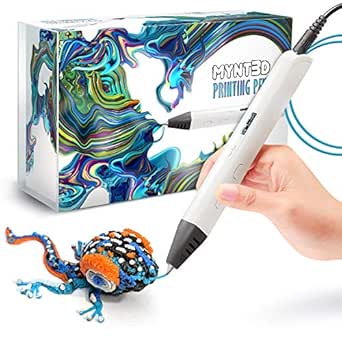 | Best for Precision Control | Brand: MYNT3D | Temperature Range: 130–240 °C | Temperature Adjustment: 1 °C Increments | VIEW LATEST PRICE | See Our Full Breakdown |
| 3D printing pen | Weight |
|---|---|
| 3Doodler Flow 3D Printing Pen | 15.8 ounces |
| SCRIB3D Advanced 3D Printing P | — |
| SCRIB3D P1 3D Printing Pen wit | 12.9 ounces |
| SCRIB3D Advanced 3D Printing P | 11.7 ounces |
| MYNT3D Super 3D Printing Pen | 7.7 ounces |
| SCRIB3D PRO 3D Printing Pen Se | — |
| SCRIB3D P1 3D Printing Pen Bun | — |
| 3Doodler Create+ 3D Printing P | 1.3 pounds |
| SCRIB3D P1 3D Printing Pen Bun | — |
| SCRIB3D P1 3D Printing Pen Bun | — |
| MYNT3D Pro 3D Pen Kit with 10- | — |
| 3Doodler Start+ Essentials 3D | 10.72 Ounces |
| MYNT3D Professional 3D Printin | 12 Ounces |
More Details on Our Top Picks
3Doodler Flow 3D Printing Pen with Filaments, Stencil Book, and Guide
The 3Doodler Flow is the pick I’d favor when a project calls for more than standard PLA: it accepts 1.75 mm PLA, ABS, and wood filament, while the SCRIB3D Advanced Bundle is limited to PLA. Its LCD temperature display gives you a way to monitor heat as you work with different materials, and the stencil book and activity guide offer a useful starting point for structured designs. The included 80 feet across eight colors is enough to explore several projects before replenishing supplies, though it is far less filament than the SCRIB3D Advanced Bundle’s 348 feet. That broader material choice comes with a tradeoff: buyers need to use compatible 1.75 mm filament and manage a heated pen, so this is less suited to anyone seeking a simple, low-heat craft tool.
Pros:- Supports 1.75 mm PLA, ABS, and wood filament
- LCD temperature monitor helps track operating heat
- Works for freehand drawing and stencil-based projects
- Includes 80 feet of filament in eight colors plus a guide and stencil book
Cons:- Requires heating filament, so it is not a low-heat craft option
- Limited to compatible 1.75 mm filament
- Includes much less filament than the SCRIB3D Advanced Bundle
Best for: Makers who want to switch among compatible PLA, ABS, and wood filament for stencil projects, freehand designs, and small repairs.
Not ideal for: Beginners who want a low-heat pen or buyers who prioritize a very large included PLA supply over material options.
- Filament compatibility:1.75 mm PLA, ABS, and wood
- Display:Integrated LCD temperature monitor
- Included filament:80 feet total in eight colors
- Included accessories:Activity guide and stencil book
- Dimensions:3.1 x 10.74 x 4.44 inches
- Weight:15.8 ounces
- Color:Black
Our verdict“Choose the 3Doodler Flow if access to several filament materials matters more to you than getting the largest bundle of PLA.”
SCRIB3D Advanced 3D Printing Pen Bundle with PLA Filament
The reason to pick this SCRIB3D bundle is plain: 348 feet of PLA in 20 colors gives frequent crafters room to make larger projects and experiment with color without quickly running short. Its variable speed control and LCD screen add useful control, while the ergonomic shape and ceramic nozzle are aimed at steady handling and smoother extrusion. Compared with the 3Doodler Flow, this set gives you far more filament, but the Flow accepts ABS and wood as well as PLA; this bundle is PLA-only. The stencil book and project guide help new users get started, though the size of the filament assortment may be excessive for someone still deciding whether 3D pen projects are a regular hobby. I’d choose it for supply depth, not material range.
Pros:- Includes 348 feet of PLA filament in 20 colors
- Variable speed control supports slower detail work and faster filling
- LCD screen provides operating information
- Ceramic nozzle and anti-clogging design
Cons:- Filament compatibility is limited to PLA
- Large filament bundle may be unnecessary for occasional users
Best for: Regular PLA crafters, classrooms, or families planning multiple projects who want many colors on hand.
Not ideal for: Makers who want to use ABS or wood filament, or occasional users unlikely to work through a large assortment.
- Filament type:PLA
- Filament diameter:1.75 mm
- Total filament length:348 feet
- Filament colors:20 assorted colors
- Pen controls:Variable speed control and LCD screen
- Nozzle:Ceramic
- Included accessories:Stencil book and project guide
Our verdict“Pick this bundle when a deep supply of colors matters more than the broader filament compatibility of the 3Doodler Flow.”
SCRIB3D P1 3D Printing Pen with Display and PLA Filament Kit
The SCRIB3D P1 suits buyers who want to tune both temperature and extrusion speed rather than stick to one material and pace. Its specified temperature ranges cover PLA and ABS, while the stepless speed slider can slow output for detail or increase it when filling a larger shape. That flexibility sets it apart from the PLA-only SCRIB3D Advanced Bundle, although the Advanced Bundle includes more filament and eight defined speed settings. The P1’s 30 feet of PLA is a modest starter supply, and it takes about two to three minutes to warm up. A ceramic nozzle, stencil guide, manual, and two-minute auto-sleep feature round out a practical kit; I’d favor it for hands-on control, not for buyers seeking a large color assortment straight away.
Pros:- Adjustable temperature settings support PLA and ABS
- Stepless speed slider accommodates detail work and faster filling
- Two-minute auto-sleep feature activates after inactivity
- Includes a stencil guide, manual, and three PLA colors
Cons:- Warm-up takes about two to three minutes
- Included PLA totals only 30 feet
- The SCRIB3D Advanced Bundle provides substantially more filament and colors
Best for: Makers learning to adjust heat and feed rate across PLA and ABS projects who value hands-on control.
Not ideal for: Crafters who want a large included filament supply or need to start drawing immediately without a warm-up.
- Filament compatibility:PLA and ABS
- PLA temperature range:160–210°C (320–410°F)
- ABS temperature range:210–235°C (410–455°F)
- Included filament:Three PLA colors, 30 feet total
- Speed control:Stepless speed slider
- Auto-sleep:After two minutes of inactivity
- Nozzle:Ceramic
- Weight:12.9 ounces
- Included accessories:Power adapter, stencil guide, and step-by-step manual
Our verdict“Choose the P1 if adjustable temperature and speed across PLA and ABS matter more than a generous starter filament bundle.”
SCRIB3D Advanced 3D Printing Pen Kit
This SCRIB3D Advanced kit is a solid fit for buyers who want a focused set of drawing controls without the much larger filament bundle of its SCRIB3D Advanced Bundle counterpart. Its LCD display, adjustable temperature, and eight speed settings make it easier to change the pace and flow for different shapes, while the ergonomic soft-touch design is intended to support a steady grip. The kit includes about 50 feet of PLA in five colors, a stencil guide, and a one-year warranty. Unlike the SCRIB3D P1, which uses a stepless speed slider and lists both PLA and ABS compatibility, this model’s supplied filament is PLA and its speed choices are stepped. It also needs a two-to-three-minute warm-up, and the nozzle and filament heat during use.
Pros:- Eight speed settings make extrusion flow adjustable
- LCD display and adjustable temperature provide operating control
- Ergonomic shape and soft-touch surface are designed for comfortable handling
- Includes five PLA colors, a stencil guide, and a one-year warranty
Cons:- Warm-up takes approximately two to three minutes
- The nozzle and filament heat during operation
- Stepped speeds offer less continuous adjustment than the SCRIB3D P1
Best for: New and casual crafters who want a comfortable PLA pen with defined speed settings and a stencil guide.
Not ideal for: Makers who want stepless speed adjustment, ABS compatibility, or a large multi-color filament supply.
- Filament:PLA, five colors, approximately 50 feet
- Speed settings:Eight
- Temperature:Adjustable
- Display:LCD
- Warm-up time:Approximately two to three minutes
- Dimensions:4.06 x 7.8 x 2.48 inches
- Weight:11.7 ounces
- Included accessories:Power adapter, manual, and stencil guide
- Warranty:One year
Our verdict“Pick this kit for comfortable PLA crafting with clear speed choices, but choose the SCRIB3D P1 if you want stepless feed control or listed ABS support.”
MYNT3D Super 3D Printing Pen
At 7.7 ounces, the MYNT3D Super is the lightest-handling choice in this group, a meaningful advantage for longer drawing sessions or users who find heavier pens tiring. Its stepless extrusion control lets you vary filament flow continuously, and adjustable temperature supports both 1.75 mm PLA and ABS. Compared with the SCRIB3D Advanced Kit, which offers eight set speeds and includes a stencil guide, the MYNT3D emphasizes a lighter body and continuously variable feed rather than a defined speed menu. The product description also calls its nozzle nearly clog-proof, but that claim does not remove the need to manage heated filament. Buyers should check the kit’s filament details, since descriptions differ on whether PLA or ABS is included, and plan for AC-adapter power.
Pros:- Lightweight 7.7-ounce design
- Stepless extrusion speed control
- Adjustable temperature supports 1.75 mm PLA and ABS
- Ultrasonically sealed nozzle is described as nearly clog-proof
Cons:- Kit descriptions differ on whether the included filament is PLA or ABS
- Requires an AC adapter for power
- Does not list a stencil guide among the included accessories
Best for: Crafters who prioritize a lightweight pen and continuous speed adjustment for longer sessions with PLA or ABS.
Not ideal for: Buyers who need a clearly specified included filament type, a stencil-focused kit, or operation without an AC adapter.
- Filament compatibility:1.75 mm ABS and PLA
- Speed control:Stepless variable extrusion
- Temperature:Adjustable
- Power output:10 W
- Input:5 V DC, 2 A
- Adapter:100–240 V AC, 50/60 Hz
- Dimensions:3.98 x 8.31 x 2.32 inches
- Weight:7.7 ounces
- Warranty:One-year limited
Our verdict“Choose the MYNT3D Super if a light body and stepless feed matter most, but verify the included filament type before buying.”
SCRIB3D PRO 3D Printing Pen Set
This set stands out for its wide material compatibility, supporting PLA, wood, bronze, and carbon fiber. Unlike the SCRIB3D P1 bundles that stick to standard PLA, the PRO allows users to experiment with composite filaments for unique textures and finishes. The real-time display provides precise feedback on temperature and speed, which is critical when switching between materials that require different heat settings. While the ergonomic design helps reduce hand fatigue during long sessions, the inclusion of multiple filament types means users must manage more inventory. This model is better suited to hobbyists who want to push beyond basic plastic drawing and into mixed-media prototyping.
Pros:- Supports a wide range of materials including wood and carbon fiber
- Real-time display shows exact temperature and speed settings
- Ergonomic design reduces hand fatigue during extended use
Cons:- Hot nozzle poses a safety risk for younger users
- Managing multiple filament types requires more storage and organization
Best for: Hobbyists interested in experimenting with wood, metal, and composite filaments.
Not ideal for: Parents looking for a simple, single-material starter kit for children.
- Material Compatibility:PLA, PHA, wood, bronze/copper, steel, carbon fiber
- Filament Size:1.75 mm
- Controls:Adjustable temperature and speed
- Display:Real-time temperature and speed readout
- Item Weight:2.24 pounds
- Recommended Age:14+
- Included Filament:10 colors including metallics and wood
Our verdict“Choose this pen if you want to explore exotic materials beyond standard PLA.”
SCRIB3D P1 3D Printing Pen Bundle with Silicone Mat and 20-Color PLA Filament
This bundle removes the guesswork from starting out by providing 20 colors of PLA filament and a two-sided silicone mat. Compared to the SCRIB3D PRO, this kit is strictly limited to PLA, but it compensates with a comprehensive learning package that includes a stencil book and project guide. The heat-resistant mat features built-in shapes, which helps beginners maintain consistent line widths and angles. While the 3Doodler Create+ offers more advanced flow control, this SCRIB3D bundle prioritizes accessibility and immediate usability. It is an ideal entry point for users who want everything needed to start drawing without researching separate accessories.
Pros:- Includes a heat-resistant silicone mat with tracing guides
- Generous 320 feet of filament across 20 colors
- Comes with a stencil book and project guide for learning
Cons:- Limited to PLA filament only
- Lacks the advanced speed control found in professional models
Best for: Complete beginners who want a ready-to-go kit with practice guides.
Not ideal for: Users who want to experiment with non-PLA materials like ABS or wood.
- Brand:SCRIB3D
- Filament Material:PLA
- Filament Length:320 feet total
- Filament Colors:20
- Included Accessories:Silicone mat, stencil book, project guide, power adapter
- Nozzle Type:Ceramic
Our verdict“This is the most convenient way to start 3D printing pen art with zero additional shopping.”
3Doodler Create+ 3D Printing Pen, Steel Blue
The 3Doodler Create+ distinguishes itself with dual-drive flow control, offering distinct fast and slow modes. This feature is a significant advantage over the SCRIB3D P1 models, which rely on manual speed sliders that can be less consistent for detailed work. The ability to switch modes instantly allows for broad coverage followed by fine detail without stopping the extrusion. However, the pen uses 3 mm filament, which is less common than the 1.75 mm standard found in most competitors. While the included project guide is helpful, it is thinner than the extensive resources found in the SCRIB3D bundles. This pen is best for users who prioritize precise extrusion control over material variety.
Pros:- Dual-drive system offers consistent fast and slow modes
- Compatible with PLA, ABS, and flexible FLEXY materials
- Includes tools and refills to get started immediately
Cons:- Requires 3 mm filament, which is harder to source than 1.75 mm
- Project guide offers fewer projects than competitor bundles
Best for: Artists who need precise control over plastic flow for detailed designs.
Not ideal for: Users who prefer the widespread availability of 1.75 mm filament.
- Brand:3Doodler
- Color:Steel Blue
- Compatible Plastics:PLA, ABS, FLEXY
- Refill Size:3 mm
- Included Refills:2 packs in 15 colors
- Weight:1.3 pounds
- Flow Control:Dual-drive fast and slow modes
Our verdict“Pick this pen if consistent extrusion speed is more important to you than filament availability.”
SCRIB3D P1 3D Printing Pen Bundle with 23 PLA Filament Colors
This bundle maximizes creative options with 23 filament colors and over 350 feet of material. While the pen itself is similar to the SCRIB3D P1 Bundle with Silicone Mat, this version swaps the mat for a larger filament assortment. The stepless speed slider allows for granular adjustments, which is useful for fine lines, though it requires more manual steadiness than the automated modes on the 3Doodler Create+. The ceramic nozzle and anti-clogging design are reliable, but the lack of a tracing mat means beginners must rely on freehand skills or external templates. This kit makes the most sense for users who already have a workspace and want the widest possible palette.
Pros:- Includes 23 colors and 358 feet of total filament
- Stepless speed slider offers fine-tuned control
- Ceramic nozzle helps prevent clogging issues
Cons:- Does not include a silicone practice mat
- Manual speed control requires steady hand for consistent lines
Best for: Creators who value a large color palette over practice guides.
Not ideal for: Absolute beginners who benefit from the structured tracing guides included in other kits.
- Model:SCRIB3D P1
- Filament Colors:23
- Total Filament Length:358 feet
- Nozzle:Ceramic
- Controls:Stepless speed slider
- Starter Filament:3 colors, 30 feet
Our verdict“Choose this option if you want the maximum number of colors without extra accessories.”
SCRIB3D P1 3D Printing Pen Bundle with Silicone Mat
This bundle focuses on skill development with a flexible silicone mat that features built-in shapes. Unlike the SCRIB3D P1 Bundle with 23 Colors, which prioritizes filament quantity, this set provides structured practice surfaces that help users learn consistent line thickness and geometry. The mat is heat-resistant and wipe-clean, making it a durable long-term accessory. While the filament selection is more limited than other bundles, the inclusion of a stencil book and project guide creates a comprehensive learning environment. This option is better suited to parents or educators who want to teach 3D printing pen basics effectively rather than just supplying materials.
Pros:- Silicone mat includes built-in shapes for tracing practice
- Reusable and easy-to-clean workspace surface
- Includes a stencil book and project guide for instruction
Cons:- Smaller filament quantity compared to other bundles
- Mat compatibility is limited to specific SCRIB3D models
Best for: Educators and parents who want structured learning tools and practice guides.
Not ideal for: Experienced users who do not need tracing templates or basic instruction.
- Brand:SCRIB3D
- Included Items:P1 Pen, silicone mat, starter filament, guides
- Mat Material:Silicone
- Mat Features:Two-sided, heat-resistant, wipe-clean
- Compatible Pens:SCRIB3D P1, Advanced, PRO
- Filament Type:PLA
Our verdict“This kit is the best choice for learning proper technique with guided practice surfaces.”
MYNT3D Pro 3D Pen Kit with 10-Color PLA Filament and DesignPad
This kit removes the friction of sourcing supplies, making it ideal for beginners who want to start drawing immediately. The inclusion of a silicone DesignPad and transparent FreePad allows for precise tracing and geometric shapes, a feature largely absent in standalone pens like the SCRIB3D P1. While the stepless speed control offers fine-tuned extrusion management, the reliance on PLA filament means users must manage temperature carefully to avoid clogs. Compared to the 3Doodler Start+, this model is less safe for young children due to higher operating temperatures, but it provides a more professional introduction to 3D modeling with its replaceable sealed nozzle, which significantly reduces maintenance headaches over time.
Pros:- Includes 10 filament colors and two specialized drawing pads
- Stepless speed control allows for precise flow adjustment
- Replaceable sealed nozzle minimizes clogging issues
- Adjustable temperature accommodates various PLA brands
Cons:- Limited to PLA filament, restricting material variety
- Higher operating temperatures make it unsuitable for young children
- Requires regular filament refills after the initial kit is exhausted
Best for: Beginners and hobbyists who want a complete, ready-to-use kit with dedicated drawing surfaces and a wide color variety without needing to buy separate accessories.
Not ideal for: Parents looking for a strictly child-safe pen, as PLA requires higher temperatures than PCL, and users who prefer ABS or PCL filament flexibility.
- Brand:MYNT3D
- Filament Material:Polylactic Acid (PLA)
- Filament Diameter:1.75 mm
- Included Colors:10 (Blue, Green, Red, Yellow, Orange, Pink, Black, Tan, Brown, Gold)
- Control Type:Stepless Speed and Adjustable Temperature
- Nozzle Type:Replaceable Sealed Nozzle
- Included Accessories:Double-sided Silicone DesignPad, Transparent FreePad
- Warranty:1-Year Limited Warranty
Our verdict“This is the most convenient entry point for new users who value included tools and immediate usability over advanced material compatibility.”
3Doodler Start+ Essentials 3D Pen Set for Kids, Ages 6+
Designed with child safety as the priority, this pen uses PCL filament that extrudes at low temperatures, ensuring no external hot parts burn small hands. This is a critical distinction from the MYNT3D Pro and other PLA-based pens, which require heating elements that reach dangerous temperatures for children. The USB-C rechargeable design adds portability, allowing kids to draw anywhere without being tethered to an outlet. However, the tradeoff is material limitation; PCL is softer and less durable than PLA or ABS, meaning finished projects may warp in warm cars. The included activity guide and DoodlePad provide structured learning, making it superior to bare-bones kits for educational settings, though it lacks the precision speed control found in adult-oriented models.
Pros:- No external hot parts, making it safe for children
- USB-C rechargeable battery allows for cordless use
- Includes activity guide and DoodlePad for guided projects
- Fast-hardening PCL filament reduces waiting time for kids
Cons:- PCL filament is less durable and heat-resistant than PLA
- Limited to PCL material, excluding standard PLA or ABS options
- Not suitable for children under 6 due to small parts and complexity
Best for: Parents and educators seeking a safe, portable, and structured creative tool for children ages 6 and older.
Not ideal for: Adult hobbyists or advanced users who need higher temperature capabilities for ABS or PETG filaments and finer structural detail.
- Brand:3Doodler
- Model:Start+
- Recommended Age:6 Years and Up
- Filament Material:PCL (Polycaprolactone)
- Power Source:USB-C Rechargeable Battery
- Weight:10.72 Ounces
- Included Components:Pen, 2 Packs PCL Filament, DoodlePad, USB Cable, Activity Guide
- Warranty:1 Year against Manufacturer Defects
Our verdict“The safest and most engaging option for young children, prioritizing protection and ease of use over professional-grade material strength.”
MYNT3D Professional 3D Printing Pen with OLED Display
This model targets users who demand fine-grained control over their extrusion process. The OLED display provides real-time temperature monitoring, a significant upgrade over the blind adjustments common in entry-level pens like the SCRIB3D P1. With temperature adjustable in 1 °C increments, it allows for perfect calibration across different PLA and ABS filament brands, reducing stringing and oozing. The ergonomic, slim design reduces hand fatigue during long sessions, outperforming bulkier competitors. However, the reliance on a wired AC adapter limits mobility compared to the battery-powered 3Doodler Start+. Additionally, some users report inconsistency in included filament types, necessitating separate purchases of high-quality material to fully leverage the pen’s precision capabilities.
Pros:- OLED display for accurate temperature monitoring
- 1 °C temperature increments for precise material calibration
- Slim, ergonomic design reduces hand strain
- Supports both PLA and ABS filaments
Cons:- Requires a wired AC adapter, limiting portability
- Included filament quantity and type consistency can vary
- Steeper learning curve compared to beginner-friendly kits
Best for: Advanced hobbyists and designers who require precise temperature calibration for different filament types and value real-time data feedback.
Not ideal for: Parents needing a child-safe tool, or users who prefer wireless convenience and all-in-one kits with abundant included filament.
- Brand:MYNT3D
- Temperature Range:130–240 °C
- Temperature Adjustment:1 °C Increments
- Display:OLED
- Power Output:10 W
- Weight:12 Ounces
- Certifications:FCC, CE, RoHS
- Warranty:1-Year Limited
Our verdict“A precision instrument for serious makers who need exact temperature control and real-time feedback, sacrificing portability for performance.”
How We Picked
I evaluated these thirteen models by analyzing their extrusion consistency, ergonomic design, and material compatibility. The primary filter was reliability: a pen that jams every third layer is useless regardless of its feature set. I prioritized units with proven feed mechanisms that handle PLA, ABS, and PETG without significant manual intervention. Secondary criteria included the quality of included accessories, such as stencils and mats, which significantly impact the learning curve for beginners.
Ranking logic favored models that offer a clear progression from beginner to advanced use. Pens with digital interfaces ranked higher than those with analog dials because temperature precision reduces failure rates. I also weighed the availability of replacement parts and community support, as 3D pens are prone to wear. The final selection reflects a mix of dedicated hobbyist tools and accessible entry-level kits, ensuring every major price point and user capability is represented.
Factors to Consider When Choosing Best 3D Printing Pens
Choosing a 3D printing pen is not just about picking a brand; it is about matching the tool’s capabilities to your intended projects. Here are the critical factors that differentiate a frustrating purchase from a rewarding creative experience.Heating System and Material Compatibility
The heart of any 3D pen is its hot end, and the range of temperatures it can reach determines which plastics you can use. Most standard pens operate between 160°C and 240°C, which covers PLA and ABS, the two most common filaments. If you plan to experiment with PETG or specialty materials like wood-filled or glow-in-the-dark plastics, look for models with wider temperature ranges and faster recovery times. Temperature stability is more important than maximum temperature; a pen that fluctuates wildly will cause inconsistent extrusion and weak prints.
Corded vs. Cordless Power Sources
Early 3D pens were tethered to power bricks, limiting your movement and creating tripping hazards. Modern cordless options use lithium-ion batteries to provide true freedom, allowing you to draw in mid-air or on curved surfaces without dragging a cable. However, this convenience comes with a tradeoff in heat consistency and runtime. Corded pens maintain a steady temperature indefinitely, making them better for large, continuous projects, while cordless pens are ideal for quick sketches and detailed work where mobility matters more than endurance.
Ergonomics and Weight Distribution
3D drawing is a fine motor activity that can cause hand fatigue quickly. Heavy pens with poorly balanced centers of gravity will feel like holding a brick after twenty minutes of use. Look for models with a slim profile and rubberized grips that reduce slippage. The weight should feel substantial enough to stay steady on the page but light enough to maneuver precisely. Some advanced models feature adjustable speed settings, which allow you to slow down the extrusion rate for delicate details, reducing the physical strain required to control the flow.
User Interface and Control Precision
Analog dials are simple but imprecise, often leading to guesswork when trying to match a specific filament’s melting point. Digital interfaces, such as OLED screens or LED displays, provide exact temperature readings and extrusion speed controls. This precision is vital for advanced users who need to switch between materials or achieve fine detail. For beginners, a simple interface with preset modes for PLA and ABS reduces the cognitive load, allowing them to focus on drawing rather than troubleshooting. The best interfaces offer clear visual feedback for heating status and jam warnings.
Nozzle Design and Maintenance Requirements
The nozzle is the wear item on a 3D pen, and its design affects both detail capability and cleaning ease. Standard 0.6mm nozzles are a compromise that works for most tasks but limits true fine detail. Some premium models offer interchangeable nozzles, allowing you to swap between 0.4mm for sketches and 0.8mm for filling shapes. Regardless of the model, you must consider maintenance; clogs are inevitable. Pens with removable nozzles or self-cleaning modes are significantly easier to maintain than those with fixed, glued-in components, extending the lifespan of the device.
Frequently Asked Questions
Can I use any brand of 3D printer filament in these pens?
Most 3D printing pens are designed to work with standard 1.75mm filament, which is the universal size for FDM 3D printers. This means you can use generic PLA or ABS spools from any reputable manufacturer, not just the brand that sold you the pen. However, always check the specific temperature range of your pen against the filament’s recommended printing temperature. Using a filament that requires higher heat than your pen can safely provide will result in poor extrusion or potential damage to the internal components. Stick to high-quality, dry filament to minimize jams, as damp plastic is a common cause of failure.
Are 3D printing pens safe for children to use?
Standard 3D printing pens use ABS or PLA plastic, which melts at temperatures high enough to cause burns, so they are generally not suitable for young children without supervision. For kids under ten, look specifically for models labeled as ‘low-temperature’ or ‘PCL-compatible,’ which use a different type of plastic that melts at around 60°C. These pens have cool-to-the-touch nozzles and safety features like automatic shut-off. If you are buying for a child, prioritize ease of loading and unloading filament, as complex mechanisms can lead to frustration and improper usage that might result in accidents.
Why does my pen keep jamming even with new filament?
Jams are typically caused by one of three issues: incorrect temperature, dirty nozzles, or poor filament quality. If the temperature is too low, the plastic won’t melt fully, causing a blockage; if it’s too high, the plastic can degrade and stick to the internal gears. Regularly cleaning the nozzle with a cleaning needle or using a cold-pull method helps remove residue. Additionally, cheap filament often has inconsistent diameters, which can get stuck in the feed gear. Ensuring the filament is fed straight and not tangled is also critical, as any tension at the spool can cause the pen to pull unevenly and jam.
What is the difference between PLA and ABS filament for drawing?
PLA is biodegradable, easier to print with, and emits a sweet, mild scent when melting, making it the preferred choice for beginners and indoor use. It is slightly more brittle than ABS but offers better detail retention. ABS is stronger, more heat-resistant, and flexible, but it emits fumes that require good ventilation and often needs a heated bed or enclosure to prevent warping, which is not possible with a pen. For most drawing applications, PLA is the superior choice due to its ease of use and lack of harmful fumes. ABS is better suited for functional parts that need to withstand stress or heat.
Do I really need a 3D pen if I have a 3D printer?
A 3D printer and a 3D pen serve different creative purposes. A printer is ideal for producing precise, repeatable objects from digital files, while a pen is a tool for freehand, artistic expression and rapid prototyping. You cannot easily ‘draw’ a complex digital model with a pen, nor can you easily sketch a freehand sculpture with a printer. Many enthusiasts use both: a printer for structural components and a pen for detailing, joining, or adding organic shapes. If your goal is digital fabrication, a printer is better; if your goal is tactile, hand-guided art, a pen is the appropriate tool.
Conclusion
Selecting the best 3D printing pens depends largely on your experience level and intended application. For the majority of users seeking a balance of power and usability, the 3Doodler Flow is the recommended choice, offering a modern, cordless experience with reliable performance. Beginners and parents should gravitate toward the 3Doodler Start+ Essentials for its safety features and ease of use, while advanced hobbyists will appreciate the precise control and professional build of the MYNT3D Professional. Those looking for a versatile bundle to start immediately should consider the SCRIB3D Advanced Bundle, which provides a solid foundation of tools and materials. Ultimately, the right pen is the one that encourages you to draw more often, so prioritize comfort and reliability over flashy features.
Black Friday Picks

Sony WH-1000XM6 Wireless Noise-Canceling Headphones, Black
As an affiliate, we earn on qualifying purchases.