
The best 35mm film scanner for most people is the Plustek OpticFilm 135i, thanks to its batch-scanning approach and support for third-party editing software. For more hands-on image control, the Plustek OpticFilm 8300i SE is a strong alternative, while the KODAK Slide N Scan models suit people who want to view and digitize images with less computer setup. The main tradeoff is between scan quality and control on one side, and speed and simplicity on the other. Flatbeds add format flexibility but take more space and can be slower for 35mm strips. Read on for the full breakdown of 15 options and the buyer priorities that separate them.

Get art and craft supplies delivered free — and shop member deals
- Fast, free delivery on millions of items
- Access to Prime Big Deal Days deals on October 6–7
- Prime Video, Amazon Music and more included
Key Takeaways
- The Plustek OpticFilm 135i leads for batch work: its automatic scanning approach is a more practical fit for larger 35mm archives than single-frame workflows.
- Plustek’s dedicated film scanners offer more image control: the 8100, 8300i SE, and 8300i Ai are aimed at buyers willing to use scanning software rather than relying on quick standalone conversion.
- Built-in screens favor convenience over editing depth: KODAK, Magnasonic, DigitPro, and similar models let buyers preview and save scans without a computer-centered workflow.
- The Epson V600 trades speed for broader use: a flatbed can handle more than 35mm film, but it is larger and less direct for scanning many small frames.
- Format support matters as much as resolution: the Kodak Mini’s 126, 110, and Super 8 support may outweigh a 35mm-focused model’s advantages for mixed-format collections.
| Plustek OpticFilm 135i Automatic Film & Slide Scanner |  | Best for Detailed Batch Scanning | Scanner type: Film scanner | Resolution: 7200 DPI | Color depth: 48 bits per pixel | VIEW LATEST PRICE | See Our Full Breakdown |
| KODAK Slide N Scan Film and Slide Scanner with 5-Inch LCD |  | Best for Easy Standalone Scanning | Scanner type: Film and slide scanner | Resolution: 22 megapixels | Display: 5-inch LCD | VIEW LATEST PRICE | See Our Full Breakdown |
| Slide & Negative Film Scanner – Converts 35mm Slides to Digital JPEG Photos |  | Best for Simple JPEG Sharing | Scanner type: Negative and slide scanner | Optical resolution: 22 megapixels | Output resolution: 1080p output | VIEW LATEST PRICE | See Our Full Breakdown |
| BEONEGLOBAL ClearScan P7 Film Scanner with 7-Inch LCD |  | Best for Mixed Film Formats | Scanner type: Film scanner | Film formats: 35mm/135, 126, 110, Super 8, and 8mm | Resolution: Up to 24MP; 3600 dpi | VIEW LATEST PRICE | See Our Full Breakdown |
| Epson Perfection V600 Photo Flatbed Scanner |  | Best for Film, Photos, and Documents | Scanner type: Flatbed color image scanner | Optical resolution: 6400 dpi | Hardware resolution: 6400 × 9600 dpi | VIEW LATEST PRICE | See Our Full Breakdown |
| DigitPro 22MP Film and Slide Scanner with 5-Inch LCD |  | Best for Format Variety | Supported formats: 35mm/135, 110, 126, 50mm slides, Super 8 | Resolution: 1080P | Color depth: 24 bits | VIEW LATEST PRICE | See Our Full Breakdown |
| Magnasonic FS71 24MP Film and Slide Scanner with 5-Inch Display and HDMI |  | Best for Fast Standalone Scanning | Supported media: 35mm, 110, 126, and Super 8 negatives; 135, 126, and 110 slides | Resolution: 24MP | Sensor: CCD | VIEW LATEST PRICE | See Our Full Breakdown |
| Plustek OpticFilm 8100 35mm Film and Slide Scanner with SilverFast SE Plus |  | Best for High-Resolution 35mm Scans | Media: 35mm negatives and slides | Optical resolution: 7200 dpi | Color depth: 48-bit | VIEW LATEST PRICE | See Our Full Breakdown |
| Plustek OpticFilm 8300i SE 35mm Film and Slide Scanner |  | Best for Dust and Scratch Correction | Media: 35mm negatives and slides | Resolution: Up to 7200 × 7200 dpi | Dynamic range: Up to 3.91 Dmax with Multi-Exposure | VIEW LATEST PRICE | See Our Full Breakdown |
| 35mm Film and Slide Scanner with 2.4-Inch Screen |  | Best Basic Compact Option | Supported media: 35mm film negatives and slides | Optical resolution: 1800 dpi | Image options: 5MP or 10MP | VIEW LATEST PRICE | See Our Full Breakdown |
| KODAK Slide N Scan Max Film Scanner |  | Best for Multiformat, Computer-Free Scanning | Scanner type: Film | Supported film formats: 135mm, 110mm, 126mm | Resolution: 3200 | VIEW LATEST PRICE | See Our Full Breakdown |
| Kodak Mini Digital Film & Slide Scanner (35mm, 126, 110, Super 8) |  | Best for Compact Multiformat Scanning | Supported formats: 35mm (135), 126, 110, Super 8, monochrome, and slides | Resolution: 14MP; up to 22MP enhanced | Image sensor: 1/2.33-inch CMOS | VIEW LATEST PRICE | See Our Full Breakdown |
| Plustek OpticFilm 8300i Ai Film Scanner with SilverFast 9 Ai Studio and Advanced IT8 Target |  | Best for Color-Controlled 35mm Archiving | Scanner type: Film | Supported media: 35mm slides and negatives | Resolution: 7200 dpi | VIEW LATEST PRICE | See Our Full Breakdown |
| KODAK SCANZA Film & Slide Scanner with 3.5-inch LCD |  | Best for Easy Viewing Across Legacy Film Formats | Supported formats: 35mm, 126, 110, Super 8, and 8mm | Sensor resolution: 14MP; up to 22MP interpolated | Display: 3.5-inch TFT LCD | VIEW LATEST PRICE | See Our Full Breakdown |
| HP HPFS500 Film and Slide Scanner | 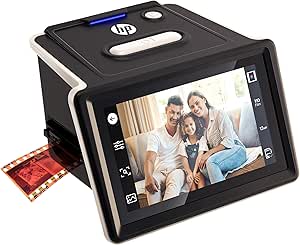 | Best for Touchscreen Batch Scanning | Supported formats: 135, 126, and 110 negatives and positive slides | Sensor resolution: 13MP CMOS | Interpolated resolution: 22MP | VIEW LATEST PRICE | See Our Full Breakdown |
| 35mm film scanner | Resolution | Color depth | Display |
|---|---|---|---|
| Plustek OpticFilm 135i Automat | 7200 DPI | 48 bits per pixel | — |
| KODAK Slide N Scan Film and Sl | 22 megapixels | 24 bits | 5-inch LCD |
| Slide & Negative Film Scanner | — | — | 5-inch HD LCD |
| BEONEGLOBAL ClearScan P7 Film | Up to 24MP; 3600 dpi | 24 bits per pixel | — |
| Epson Perfection V600 Photo Fl | — | — | — |
| DigitPro 22MP Film and Slide S | 1080P | 24 bits | 5-inch LCD |
| Magnasonic FS71 24MP Film and | 24MP | 24 bits per pixel | 5-inch LCD |
| Plustek OpticFilm 8100 35mm Fi | — | 48-bit | — |
| Plustek OpticFilm 8300i SE 35m | Up to 7200 × 7200 dpi | — | — |
| 35mm Film and Slide Scanner wi | — | — | 2.4-inch color screen |
| KODAK Slide N Scan Max Film Sc | 3200 | 24 bits | 7-inch tilting LCD |
| Kodak Mini Digital Film & Slid | 14MP; up to 22MP enhanced | — | 2.4-inch color TFT LCD |
| Plustek OpticFilm 8300i Ai Fil | 7200 dpi | — | — |
| KODAK SCANZA Film & Slide Scan | — | 24 bpp | 3.5-inch TFT LCD |
| HP HPFS500 Film and Slide Scan | — | 24 bits | 5-inch all-angle LCD touchscreen |
More Details on Our Top Picks
Plustek OpticFilm 135i Automatic Film & Slide Scanner
The OpticFilm 135i is the strongest fit here for photographers who want detailed scans from a stack of 35mm frames, not just quick copies for sharing. Its stated 7200 DPI resolution, 48-bit color depth, and infrared-assisted dust and scratch reduction target finer detail and less cleanup than the standalone LCD models, including the KODAK Slide N Scan. Batch capacity—up to six film frames or four mounted slides—also makes it better suited to a backlog than one-at-a-time scanning. It accepts panoramic and half-frame formats alongside standard 35mm, adding flexibility for varied archives. The tradeoff is a larger, computer-dependent setup: its footprint is substantial, and the supplied requirements mention Windows but not macOS. Choose it for control and detail; skip it if you want a compact scanner that saves straight to a card.
Pros:- 7200 DPI and 48-bit color depth are aimed at detailed, flexible scan files.
- Infrared enhancement can reduce the visibility of dust and scratches.
- Batch scanning handles up to six frames or four mounted slides per run.
- Supports standard, panoramic, and half-frame 35mm formats.
Cons:- The 13.58-inch width and 7.48-inch height take up noticeable desk space.
- Minimum system requirements list Windows 7; macOS support is not specified.
- A more involved computer-based workflow is less convenient than the KODAK Slide N Scan’s on-device preview and card storage.
Best for: 35mm photographers digitizing sizeable collections who value high-detail scans, batch handling, and support for panoramic or half-frame film.
Not ideal for: Mac users who need confirmed native support, or anyone seeking a small standalone scanner with an on-device screen and direct memory-card workflow.
- Scanner type:Film scanner
- Resolution:7200 DPI
- Color depth:48 bits per pixel
- Film formats:35mm, including panoramic and half-frame
- Batch capacity:Up to six film frames or four slides
- Media:Negatives and slides
- Dimensions:9.65 × 13.58 × 7.48 inches
- Weight:1612 g
- Minimum system requirement:Windows 7
Our verdict“Choose the OpticFilm 135i for batch-friendly, high-detail 35mm scanning, but pick an LCD model if you want a simpler standalone workflow.”
KODAK Slide N Scan Film and Slide Scanner with 5-Inch LCD
The KODAK Slide N Scan puts ease of use ahead of the fine-control approach represented by the Plustek OpticFilm 135i. Its 5-inch LCD lets you preview and edit scans on the device, then save them directly to an SD or SDHC card, so a computer need not be the center of the workflow. Support for 135, 110, and 126 negatives, plus 50 mm slides, makes it handy for households with mixed-format film. The 22-megapixel CMOS sensor is designed for accessible digital copies rather than the Plustek’s higher stated scan resolution and 48-bit color depth. You will need to supply the memory card, and the listed formats leave out panoramic and half-frame support. Pick this for convenient family archiving; look elsewhere if detail control and batch scanning matter more.
Pros:- 5-inch screen supports on-device preview and editing.
- Scans 135, 110, and 126 negatives and 50 mm slides.
- Saves digital photos directly to SD or SDHC cards.
- USB and HDMI connections offer ways to transfer or display images.
Cons:- SD or SDHC storage card is not included.
- Listed film-format support is narrower than the BEONEGLOBAL ClearScan P7’s, which also lists Super 8 and 8mm.
- Its 22-megapixel, 24-bit output is less suited to buyers seeking the higher stated scan detail and color depth of the Plustek OpticFilm 135i.
Best for: Families and casual film owners who want to preview, make basic edits, and save scans directly to a card without relying on a computer.
Not ideal for: Photographers seeking high-resolution, batch-oriented 35mm scanning or collectors whose film includes formats beyond 135, 110, and 126.
- Scanner type:Film and slide scanner
- Resolution:22 megapixels
- Display:5-inch LCD
- Supported film:135, 110, and 126 negatives; 50 mm slides
- Storage:SD or SDHC card up to 32 GB; card not included
- Connections:USB and HDMI
- Optical sensor:CMOS
- Color depth:24 bits
- Dimensions and weight:5.27 × 5.35 × 3.74 inches; 16 ounces
Our verdict“Choose the KODAK Slide N Scan for convenient on-device digitizing across several common formats, not for fine-detail archival work.”
Slide & Negative Film Scanner – Converts 35mm Slides to Digital JPEG Photos
The DigitConvert Slide & Negative Film Scanner suits buyers who want a direct path from film to shareable JPEGs, with little emphasis on file-format flexibility. Its 22MP optical sensor and 5-inch HD LCD support on-device preview, gallery browsing, and basic edits; HDMI and USB-C connections provide options for viewing or transferring images. Compared with the KODAK Slide N Scan, this model lists a 36-month warranty and includes a power supply and cables, though both rely on an SD card that is not included. The clearest limitation is its JPEG-only output, which gives less latitude for later editing than a workflow built around flexible scan files. It also needs external power while operating. Choose it for straightforward home digitizing and sharing, not for a demanding archival workflow.
Pros:- 22MP optical resolution supports detailed everyday digital copies.
- 5-inch HD LCD provides preview and gallery viewing.
- One-touch operation and built-in editing keep basic scanning on the device.
- Includes adapters, cables, and a power supply, with a listed 36-month warranty.
Cons:- JPEG is the only listed output format, limiting editing flexibility.
- An SD card is required but not included.
- Requires an external power source during use, unlike a more self-contained workflow.
Best for: Casual users digitizing 135 or 110 negatives and slides who want an included setup kit, screen-based previews, and JPEG files ready to share.
Not ideal for: Film archivists or editing-focused photographers who need formats beyond JPEG, high bit-depth files, or a scanner that operates without external power.
- Scanner type:Negative and slide scanner
- Optical resolution:22 megapixels
- Output resolution:1080p output
- Optical sensor:CMOS
- Supported film:135 and 110 negatives and slides
- Display:5-inch HD LCD
- Connections:HDMI and USB Type-C
- Output format:JPEG
- Weight and warranty:0.5 kg; 36 months
Our verdict“Pick DigitConvert for simple JPEG scans and a ready-to-use accessory kit, but choose a more flexible scanner for archival editing.”
BEONEGLOBAL ClearScan P7 Film Scanner with 7-Inch LCD
The BEONEGLOBAL ClearScan P7 is the most format-flexible standalone pick in this group: its listed compatibility spans 35mm, 126, 110, Super 8, and 8mm film. That range sets it apart from the KODAK Slide N Scan, which covers several still-film formats but does not list motion-picture film. A 7-inch LCD, one-touch controls, and included SD card also make it easier to preview and save scans without buying storage separately. The stated resolution needs a careful read: the product lists both up to 24MP and 3600 dpi, so buyers should not assume those figures mean the same thing or match the Plustek OpticFilm 135i’s 7200 DPI figure. It is a practical family-archive tool, but its 24-bit color depth and compact sensor are less compelling for demanding restoration or fine-detail work.
Pros:- Supports a broad set of formats, including Super 8 and 8mm.
- Large 7-inch LCD makes previewing and adjusting images easier.
- One-touch standalone operation does not require a computer-based workflow.
- An SD card is included for saving scans.
Cons:- The listed 24MP and 3600 dpi figures may be difficult to compare directly with scanners that specify a single scan resolution.
- 24-bit color depth is below the 48-bit specification of the Plustek OpticFilm 135i and Epson V600.
- Its format range and large display come with less emphasis on fine 35mm detail than the Plustek OpticFilm 135i.
Best for: Households with a mix of 35mm, 110, 126, Super 8, and 8mm film that want a standalone scanner with a large preview screen.
Not ideal for: Photographers focused on maximum 35mm detail, consistent archival specifications, or advanced color and dust correction.
- Scanner type:Film scanner
- Film formats:35mm/135, 126, 110, Super 8, and 8mm
- Resolution:Up to 24MP; 3600 dpi
- Sensor:1/2.3-inch CMOS
- LCD screen:7 inches
- Color depth:24 bits per pixel
- Storage and connection:SD card and USB
- Dimensions:4.1 × 7.1 × 6.1 inches
- Weight and warranty:15.68 ounces; 1 year
Our verdict“Choose the ClearScan P7 for a varied family film archive and easy standalone viewing, not for the most demanding 35mm scans.”
Epson Perfection V600 Photo Flatbed Scanner
The Epson Perfection V600 makes the most sense for buyers who need more than a dedicated 35mm scanner. Its transparency unit handles up to 12 frames of 35mm film, four mounted slides, or medium-format frames, while the flatbed also scans prints and documents. That versatility distinguishes it from the Plustek OpticFilm 135i, which is more specialized for 35mm and offers a higher stated 7200 DPI resolution with batch-oriented film handling. Epson lists 6400 dpi optical resolution, 48-bit color, Digital ICE, and Easy Photo Fix tools, useful for restoring older originals and editing scans. In return, the V600 is a large, 9-pound flatbed with only USB 2.0 listed for connectivity. It is a capable all-purpose home scanner, but a dedicated film model is a better fit if 35mm scanning is the only job.
Pros:- Transparency unit handles 35mm slides and negatives as well as medium-format film.
- Flatbed also scans photos and documents, making it more versatile than a dedicated film scanner.
- 48-bit color depth and Digital ICE and Easy Photo Fix tools support detailed scans and image restoration.
- ReadyScan LED works without a warm-up period.
Cons:- At 11 × 19 inches and 9 pounds, it takes more space than the compact standalone scanners.
- USB 2.0 is the only listed connection option.
- Its 6400 dpi optical resolution is below the Plustek OpticFilm 135i’s stated 7200 DPI, and flatbed handling is less specialized for 35mm film.
Best for: Home archivists who want one device for 35mm negatives, slides, medium-format film, prints, and documents, with restoration tools for aging originals.
Not ideal for: 35mm-only photographers who prioritize a smaller footprint, a dedicated film workflow, or connectivity beyond the listed USB 2.0 connection.
- Scanner type:Flatbed color image scanner
- Optical resolution:6400 dpi
- Hardware resolution:6400 × 9600 dpi
- Maximum resolution:12,800 × 12,800 dpi
- Maximum scan area:8.5 × 11.7 inches
- Film capacity:Four mounted 35mm slides, 12 frames of 35mm film, or two medium-format frames up to 6 × 22 cm
- Color and grayscale depth:48-bit color; 16-bit grayscale
- Connectivity:Hi-Speed USB 2.0
- Dimensions and weight:11 × 19 × 4.6 inches; 9 lb
Our verdict“Choose the V600 if you need film scanning alongside document and photo scanning; for a 35mm-only archive, the Plustek OpticFilm 135i is the more focused option.”
DigitPro 22MP Film and Slide Scanner with 5-Inch LCD
The DigitPro is the most format-flexible standalone pick in this group: it handles 35mm, 110, 126, 50mm slides, and Super 8, while the Plustek OpticFilm 8100 is limited to 35mm negatives and slides. Its 5-inch LCD lets you preview and make basic edits at the scanner, so you can digitize without setting up computer software. HDMI playback is handy for showing scans on a larger screen, but the listed 1080P resolution and 24-bit color make this more of a convenient archive tool than a detail-focused choice for large prints. The 128MB built-in memory is only a small stopgap; you’ll need a compatible SD card for a practical batch of images, and it is not included.
Pros:- Supports several film formats, including Super 8
- Standalone scanning with one-touch operation
- Large 5-inch LCD for previewing and playback
- HDMI and Type-C USB connections
Cons:- 128MB built-in memory holds very few scans
- SD card is required for practical storage and is not included
Best for: Households with a mix of 35mm, 110, 126, slide, and Super 8 film that want simple standalone scanning.
Not ideal for: Photographers seeking high-resolution 35mm scans for detailed editing or large prints; its listed resolution is 1080P, and the built-in memory is limited.
- Supported formats:35mm/135, 110, 126, 50mm slides, Super 8
- Resolution:1080P
- Color depth:24 bits
- Display:5-inch LCD
- Built-in memory:128MB
- External storage:SD card up to 64GB; card not included
- Connections:HDMI, Type-C USB
- Weight:0.6 kg
- Warranty:3 years
Our verdict“Choose the DigitPro if you need one straightforward scanner for several legacy film formats, not maximum 35mm scan detail.”
Magnasonic FS71 24MP Film and Slide Scanner with 5-Inch Display and HDMI
The Magnasonic FS71 is a strong fit for people who want quick scans without opening a computer: its trays load fast, and the maker specifies scans in under five seconds each. It covers 35mm, 110, 126, and Super 8, with on-device brightness and color adjustments, much like the DigitPro, but it offers 24MP JPEG output rather than the DigitPro’s listed 1080P resolution. That gives it a more appealing stated output for casual sharing and archiving, though it still saves JPEGs rather than offering a pro-oriented raw workflow. The 5-inch display and HDMI output make reviewing images easy, but an SD card is mandatory and neither that card nor an HDMI cable is included. Unlike the Plustek OpticFilm 8300i SE, it prioritizes speed and convenience over infrared dust correction.
Pros:- Scans several film formats, including Super 8
- Fast tray-based operation with scans specified at under five seconds each
- On-device brightness and color adjustments
- 5-inch LCD and HDMI output for viewing scans
Cons:- Requires an SD card to save images; none is included
- HDMI cable is not included
- JPEG-focused standalone workflow offers less editing flexibility than dedicated computer-based scanners
Best for: Film owners who want to digitize mixed formats quickly, adjust scans on the device, and view results on a TV.
Not ideal for: Users who want computer-based fine control, infrared dust and scratch correction, or a scanning setup that works without a separate SD card.
- Supported media:35mm, 110, 126, and Super 8 negatives; 135, 126, and 110 slides
- Resolution:24MP
- Sensor:CCD
- Color depth:24 bits per pixel
- Display:5-inch LCD
- Connections:HDMI, USB
- Maximum SD card capacity:128GB
- Dimensions:4.44 × 5.43 × 4.91 inches
- Warranty:1 year
Our verdict“Pick the FS71 for speedy, computer-free digitizing of mixed film formats, but choose a Plustek if scan correction and editing matter more.”
Plustek OpticFilm 8100 35mm Film and Slide Scanner with SilverFast SE Plus
The OpticFilm 8100 is the dedicated choice here for buyers who care more about 35mm scan detail than quick, screen-based convenience. Its 7200 dpi optical resolution and 48-bit color output give it a stronger specification set for careful editing than the standalone Magnasonic FS71, which emphasizes fast JPEG capture and an onboard display. The tradeoff is a narrower job: the 8100 scans only 35mm negatives and slides, so it cannot handle the smaller formats accepted by the DigitPro. It also connects by USB and relies on included computer software, making it a better match for a desk-based workflow than quick scans directly to a memory card. SilverFast SE Plus adds dedicated scanning tools, but software setup and a one-year limited warranty are part of the equation.
Pros:- Optical resolution up to 7200 dpi
- 48-bit color output supports more editing latitude
- Includes SilverFast SE Plus and Plustek QuickScan
- Works with supported Windows and Mac systems
Cons:- Limited to 35mm negatives and slides
- Requires a computer-based scanning workflow rather than standalone operation
- One-year limited warranty
Best for: 35mm film photographers who want high-resolution, high-bit-depth scans and are comfortable scanning through computer software.
Not ideal for: Families digitizing 110, 126, or Super 8, or anyone who wants a standalone scanner with an LCD and direct memory-card workflow.
- Media:35mm negatives and slides
- Optical resolution:7200 dpi
- Color depth:48-bit
- Optical sensor:CCD
- Light source:LED
- Connection:USB
- Included software:Plustek QuickScan and SilverFast SE Plus
- Dimensions:4.72 × 10.71 × 4.69 inches
- Warranty:1 year limited
Our verdict“Choose the OpticFilm 8100 for detailed 35mm scans and software-based control, not for mixed-format or quick standalone digitizing.”
Plustek OpticFilm 8300i SE 35mm Film and Slide Scanner
The OpticFilm 8300i SE earns its place over the OpticFilm 8100 by adding an infrared channel and SilverFast iSRD, tools designed to detect and reduce dust and scratches during scanning. That can save cleanup time when working through older, imperfect negatives or slides. Both Plustek models list up to 7200 dpi and focus exclusively on 35mm, so the 8300i SE’s main distinction is correction support rather than broader format coverage. The Magnasonic FS71 is easier for fast, standalone scans, but it does not offer this computer-based infrared correction workflow. The 8300i SE includes SilverFast SE Plus 9 and QuickScan Plus, although software setup and operating-system compatibility should be checked before purchase. Its format limit remains firm: owners of 110, 126, or Super 8 film need another option.
Pros:- Resolution up to 7200 × 7200 dpi
- Infrared channel works with iSRD to help detect and remove dust and scratches
- Includes SilverFast SE Plus 9 and Plustek QuickScan Plus
- Lifetime technical support
Cons:- Scans only 35mm negatives and slides
- Computer and compatible software workflow is less immediate than standalone scanners
- Listed macOS support extends through macOS 12.x
Best for: 35mm film archivists who scan dusty or scratched originals and want software-assisted cleanup alongside high-resolution capture.
Not ideal for: People with mixed film formats or anyone who prefers fast scans on a built-in screen without computer software.
- Media:35mm negatives and slides
- Resolution:Up to 7200 × 7200 dpi
- Dynamic range:Up to 3.91 Dmax with Multi-Exposure
- Dust and scratch correction:Infrared channel with SilverFast iSRD
- Connection:USB
- Included software:SilverFast SE Plus 9 and Plustek QuickScan Plus
- Operating systems:Windows 7/8/10/11; macOS 10.13–12.x
- Support:Lifetime technical support
Our verdict“Choose the 8300i SE over the 8100 when infrared-assisted dust and scratch cleanup is worth more to you than a basic high-resolution scan workflow.”
35mm Film and Slide Scanner with 2.4-Inch Screen
This compact standalone scanner suits buyers who want simple 35mm transfers and do not need the larger displays or broader format support of the DigitPro and Magnasonic FS71. Its 2.4-inch screen supports previewing and basic adjustments such as brightness, flipping, and mirroring, while USB transfer and video output offer straightforward ways to move or show JPEG scans. The listed output is 5MP or 10MP at 1800 dpi, a more modest specification than the Plustek OpticFilm 8100’s 7200 dpi target for detailed computer-based scanning. That difference matters if you plan to crop heavily or make larger prints. This model is limited to 35mm negatives and slides, and it needs an SD card of up to 32GB that is not included. Its appeal is uncomplicated operation, not archival-level control.
Pros:- Standalone scanning without computer software or drivers
- Built-in screen offers preview and basic image adjustments
- USB transfer and video output for playback
- Film and slide adapters support batch scanning
Cons:- Limited to 35mm negatives and slides
- 1800 dpi and 5MP or 10MP output are less suited to heavy cropping or large prints than the Plustek OpticFilm 8100
- SD card up to 32GB is required and not included
Best for: Casual 35mm film owners who want a small, standalone device for previews, basic JPEG copies, and simple USB transfer.
Not ideal for: People scanning several film formats, seeking detailed edits or larger-print output, or needing ample included storage.
- Supported media:35mm film negatives and slides
- Optical resolution:1800 dpi
- Image options:5MP or 10MP
- Output format:JPEG
- Display:2.4-inch color screen
- Storage:SD card up to 32GB; card not included
- Connections:USB, video jack
- Warranty:1 year
Our verdict“Pick this scanner for uncomplicated 35mm JPEG copies on a modest setup, but choose the Plustek 8100 when scan detail is the priority.”
KODAK Slide N Scan Max Film Scanner
The KODAK Slide N Scan Max is a practical choice for families with mixed-format archives: its quick-feed tray handles 135, 110, and 126 film, and it saves scans to an SD or SDHC card without requiring a computer. That makes it more convenient for casual digitizing than the Plustek OpticFilm 8300i Ai, which is a dedicated 35mm scanner built around computer software and more involved color control. The Max also gives you a 7-inch tilting LCD for previewing and making simple edits on the device. The tradeoff is that its 3200-resolution workflow and 24-bit color depth are aimed at accessible sharing, not the finer control expected for demanding archival work. Storage is capped at 32GB, and the listed minimum system requirement is Windows 7, so buyers should check their setup if they plan to connect it to a computer.
Pros:- Quick-feed tray supports continuous scanning
- Works standalone and saves directly to an SD or SDHC card
- Supports 135, 110, and 126 film formats
- Large tilting LCD and one-touch editing simplify previewing
Cons:- SD or SDHC storage is limited to 32GB
- Its 3200 resolution and 24-bit color depth are less suited to demanding archival work
- Listed minimum system requirement is Windows 7, which may not fit some computer setups
Best for: Families digitizing a mix of 35mm, 110, and 126 negatives or slides who want to scan and preview without a computer.
Not ideal for: Film photographers seeking detailed 35mm archival scans, extensive color-management tools, or storage beyond a 32GB card.
- Scanner type:Film
- Supported film formats:135mm, 110mm, 126mm
- Resolution:3200
- Color depth:24 bits
- Sensor and light source:CMOS sensor; LED light
- Display:7-inch tilting LCD
- Storage:SD or SDHC cards up to 32GB
- Dimensions and weight:6.69 × 5.35 × 4.45 inches; 16 ounces
- Warranty:1-year limited
Our verdict“Choose the Slide N Scan Max for convenient, computer-free digitizing across several common film formats, not for high-control archival scans.”
Kodak Mini Digital Film & Slide Scanner (35mm, 126, 110, Super 8)
For buyers with a small workspace and a varied collection, the Kodak Mini Digital Film & Slide Scanner packs support for 35mm, 126, 110, and Super 8 into a compact body weighing just 8.82 ounces. Its standalone operation lets you make JPEGs and adjust brightness, color, and orientation on the 2.4-inch LCD, so basic scanning does not depend on a computer. Compared with the larger KODAK SCANZA, this model takes up less space but gives you a smaller screen for judging a crop or an edit. The headline 22MP figure is interpolated from a 14MP scan, not native optical detail, which makes it a poor match for buyers who need maximum image information. The 128MB internal memory is only a stopgap: an SD card is needed for practical storage, and it is not included.
Pros:- Supports 35mm, 126, 110, and Super 8 formats
- Scans and edits without requiring a computer
- Compact 8.82-ounce design
- Interchangeable adapters support fast film loading
Cons:- 22MP output is interpolated from a 14MP sensor
- 128MB internal memory is limited, and an SD card is not included
- The 2.4-inch display offers less preview space than the KODAK SCANZA’s 3.5-inch screen
Best for: Space-conscious families with 35mm, 126, 110, or Super 8 film who want compact, standalone JPEG scanning and simple on-device adjustments.
Not ideal for: Photographers who need native high-resolution capture, a large preview screen, or useful storage without buying a separate SD card.
- Supported formats:35mm (135), 126, 110, Super 8, monochrome, and slides
- Resolution:14MP; up to 22MP enhanced
- Image sensor:1/2.33-inch CMOS
- Display:2.4-inch color TFT LCD
- Output format:JPEG
- Memory:128MB internal; SD card up to 32GB, not included
- Connectivity:USB 2.0 and NTSC/PAL TV-Out
- Dimensions and weight:3.43 × 3.41 × 4.04 inches; 8.82 ounces
- Power:DC 5V adapter or Mini USB
Our verdict“Pick the Kodak Mini if compact size and broad format support matter more than native resolution or a roomy preview screen.”
Plustek OpticFilm 8300i Ai Film Scanner with SilverFast 9 Ai Studio and Advanced IT8 Target
The Plustek OpticFilm 8300i Ai is the specialist in this group: its 7200 dpi CCD capture, 16-bit color depth, bundled SilverFast 9 Ai Studio, and ISO-compliant IT8 target suit careful 35mm scanning and repeatable color work. The calibration target and software give buyers more control than the standalone Kodak scanners, which focus on quick JPEG output and on-device editing. A newer chip is listed as improving scan speed by 38% over previous models, helping reduce the wait without changing this from a more deliberate computer-based workflow. Its narrow remit is the main compromise: it supports 35mm slides and negatives, with no medium-format support listed. It is also substantially heavier than compact options such as the Kodak Mini. This makes sense when scan control matters more than broad format compatibility or portability.
Pros:- 7200 dpi CCD scanning with 16-bit color depth
- Includes SilverFast 9 Ai Studio software
- Advanced IT8 target supports color calibration
- Works with Windows and Mac OS
Cons:- Supported media is limited to 35mm slides and negatives, with no medium-format support listed
- At 2.74 kg, it is far less portable than the Kodak Mini
- Computer-based scanning and software require a more involved workflow than standalone Kodak models
Best for: 35mm photographers and archivists who want high-resolution scans, calibrated color, and advanced software tools on Windows or Mac.
Not ideal for: Buyers digitizing 110, 126, or medium-format film, or anyone wanting a lightweight standalone scanner with a built-in preview screen.
- Scanner type:Film
- Supported media:35mm slides and negatives
- Resolution:7200 dpi
- Sensor and light source:CCD sensor; LED light
- Color and greyscale depth:16 bits
- Software and calibration:SilverFast 9 Ai Studio and ISO-compliant IT8 target
- Connection:USB
- Supported operating systems:Windows 7/8/10/11 and Mac OS
- Dimensions and weight:10.7 × 4.73 × 4.7 inches; 2.74 kg
Our verdict“Choose the OpticFilm 8300i Ai for controlled, high-resolution 35mm work if you accept its narrower format support and computer-based workflow.”
KODAK SCANZA Film & Slide Scanner with 3.5-inch LCD
The KODAK SCANZA suits buyers who want a straightforward way to turn several kinds of old film into JPEGs, including 35mm, 126, 110, Super 8, and 8mm. Its 3.5-inch adjustable LCD is easier to work with than the 2.4-inch screen on the Kodak Mini when previewing and editing, while the included adapters make switching formats less of a chore. The 14MP sensor can produce an interpolated 22MP file, but that larger output does not add captured detail; buyers seeking fine 35mm scans should look instead at the Plustek OpticFilm 8300i Ai and its 7200 dpi CCD approach. SCANZA is geared toward still-image conversion: Super 8 becomes stills, not video, and the device cannot scan developed prints or undeveloped film. An SD card is also required but not supplied.
Pros:- Supports 35mm, 126, 110, Super 8, and 8mm formats
- 3.5-inch LCD supports image viewing and editing
- Includes multiple film adapters and connection cables
- Stores JPEG scans on SD cards up to 128GB
Cons:- 22MP output is interpolated from a 14MP sensor
- SD card is required but not included
- Converts Super 8 to still images rather than video
Best for: Families digitizing a mixed collection of 35mm, 126, 110, Super 8, and 8mm film who value a larger built-in viewing screen.
Not ideal for: Photographers seeking detailed archival scans, Super 8 video transfers, or a scanner for prints and undeveloped film.
- Supported formats:35mm, 126, 110, Super 8, and 8mm
- Sensor resolution:14MP; up to 22MP interpolated
- Display:3.5-inch TFT LCD
- Color depth:24 bpp
- Connectivity:HDMI, USB, and video cable
- Storage:SD card up to 128GB, not included
- Dimensions and weight:4.7 × 4.7 × 5 inches; 16 ounces
- Output:JPEG
Our verdict“Choose the SCANZA for accessible still-image conversion across legacy film formats, but look to the Plustek for more demanding 35mm detail.”
HP HPFS500 Film and Slide Scanner
The HP HPFS500 brings a useful middle ground to casual 35mm digitizing: its quick-load tray is designed for batch work, while the 5-inch touchscreen lets you preview and edit scans without sitting at a computer. It also handles 126 and 110 negatives and slides, making it more versatile than the 35mm-only Plustek OpticFilm 8300i Ai for households with several film formats. The catch is image detail: its 13MP CMOS sensor produces a listed 22MP figure through interpolation, so that output should not be mistaken for native 22MP capture. The product data lists SD card storage but does not state a capacity or say that a card is included, so buyers should confirm storage arrangements before scanning a large archive. Its Windows 10-or-later and macOS 10.15-or-later requirements also narrow computer compatibility if you plan to connect it.
Pros:- Quick-load tray supports batch scanning
- Standalone scanning with touchscreen preview and editing
- Supports 135, 126, and 110 negatives and positive slides
- Compact 13.4-ounce design
Cons:- 22MP output is interpolated from a 13MP CMOS sensor
- No support for Super 8 or other formats beyond 135, 126, and 110 is listed
- SD card capacity and whether a card is included are not specified
Best for: Home users digitizing batches of 35mm, 126, or 110 negatives and slides who want touchscreen preview and editing without a computer.
Not ideal for: Film photographers who need native 22MP capture, advanced color-calibration software, or support for formats beyond 135, 126, and 110.
- Supported formats:135, 126, and 110 negatives and positive slides
- Sensor resolution:13MP CMOS
- Interpolated resolution:22MP
- Display:5-inch all-angle LCD touchscreen
- Color depth:24 bits
- Connectivity and storage:USB; SD card media
- Dimensions and weight:4.66 × 5.7 × 3.54 inches; 13.4 ounces
- Minimum system requirements:Windows 10 or later; macOS 10.15 or later
- Warranty:1-year limited
Our verdict“Pick the HPFS500 for convenient touchscreen batch scanning across three common film formats, not for native 22MP detail or advanced color control.”
How We Picked
I ranked these scanners by how well their design matches common 35mm film tasks: converting a few family slides, digitizing a large archive, or producing files for careful editing and printing. I weighed the scanning workflow, supported film formats, software and computer dependence, preview options, batch handling, and the amount of manual work each approach can involve. A high advertised resolution alone does not settle the ranking; usable control, consistent handling, and a sensible fit for the buyer’s collection matter too.
The Plustek OpticFilm 135i ranks first because its batch-focused approach offers a useful balance of throughput and editing flexibility. Dedicated Plustek models follow for buyers who want more software control, while standalone LCD scanners rank higher for straightforward operation rather than intensive editing. The Epson V600 earns a distinct place for format versatility, and the remaining models are differentiated by their screen-based workflow, stated resolution, format support, and practical audience. Where specifications alone cannot establish output quality, I avoid treating a larger number as proof of a better scan.
Factors to Consider When Choosing Best 35mm Film Scanners
Before choosing a scanner, decide what you need the finished files to do and how much time you can give each frame. A fast, self-contained converter can be a better fit than a more adjustable scanner if you mainly want to share old snapshots. For archival work or large prints, focus on the whole capture and editing process rather than a single headline specification.
Match the scanner to your output
Start with the final use: phone viewing, online sharing, family records, or large prints. Small screens and social posts often do not call for a workflow built around extensive manual correction. Larger prints and careful restoration benefit from files that can be edited and rescanned with deliberate settings. Do not assume that a high advertised DPI figure guarantees fine detail; optics, film condition, focus, and software processing all affect the result. Compare sample scans from the same type of film when available, especially if shadow detail or fine grain matters to you. Paying for advanced controls makes less sense if you plan to accept the scanner’s first conversion and move on.
Choose between standalone and computer-based scanning
A scanner with a built-in screen can make the process feel immediate: preview a frame, save it, and continue without managing a separate scanning application. That convenience may come with fewer options for exposure, color correction, dust handling, or file organization. Computer-based models ask for more setup and software familiarity, but can offer a more deliberate editing path. Think about where you want to spend effort: at the scanner, at the computer, or as little as possible. Check how files transfer and what storage media or connections the model accepts before purchase. A smooth preview workflow is not the same as a strong archival workflow.
Estimate how many frames you will scan
For a handful of negatives, loading frames one at a time may be perfectly manageable. A box of hundreds changes the calculation: loading, cropping, naming, and checking every image can take longer than the actual scan. Batch capability can reduce repeated handling, but check which holders and film arrangements it supports rather than assuming every strip can be processed unattended. Automatic workflows also need oversight for misfeeds, rotated frames, and inconsistent exposure. If your archive is large, scan a representative roll first and track the time per usable image. That small trial can reveal whether convenience features are worth more to you than finer manual control.
Check every format in your collection
“Film scanner” does not mean every model handles the same media. Some options focus on 35mm negatives and mounted slides, while others add formats such as 126, 110, or Super 8. Make a list of the formats you own before choosing, including whether your slides are mounted and whether your negatives are cut into strips. Holders can be format-specific, and an unsupported film type may require a separate device or service. A flatbed such as the Epson V600 can serve a wider range of scanning tasks, but its size and workflow may be excessive if you only have 35mm frames. Buying for the collection you actually have avoids paying for flexibility you will not use—or discovering a format gap later.
Budget time for color correction and dust
Digitizing film rarely ends when the scanner saves a file. Old negatives may have fading, color casts, dust, scratches, or uneven exposure, and software varies in how much correction it supports. A quick standalone scanner can create useful reference copies, but you may still need image-editing software for difficult frames. Infrared dust-removal features are not universal and can behave differently with black-and-white film, so check compatibility before treating them as a must-have. Consider the condition and importance of your originals: replaceable snapshots may need a simple workflow, while irreplaceable family images may justify slower, more careful capture. Include file naming, backups, and time for quality checks in your plan.
Treat resolution claims as one part of the decision
Resolution numbers can look decisive, but they do not describe the full quality of a scan. The lens, focus stability, sensor, film holder, software sharpening, and the quality of the original all shape usable detail. A scanner that offers more control may produce a better result in practiced hands, yet demand more time and knowledge than a screen-based converter. Compare the file dimensions and real-world examples rather than ranking models by advertised DPI alone. Also check whether the software exports files in formats suited to your editing and storage needs. Choose the tool that produces files you can use confidently, not the largest specification printed on its listing.
Frequently Asked Questions
Is a standalone LCD film scanner good enough for preserving family negatives?
It can be a practical way to make accessible digital copies, especially when ease of use matters more than detailed editing. Before relying on it as your only archive, check the saved file dimensions, transfer method, and whether you can adjust exposure or color. Keep the original negatives, since a scan does not replace the source. For irreplaceable images or planned large prints, compare sample files with a computer-based scanner workflow. A quick converter is most convincing when its output meets your intended use, not simply because it has a screen.
Should I choose the Plustek OpticFilm 135i or a standalone KODAK scanner?
Choose the 135i if you expect to scan many frames and want a batch-oriented process with third-party editing software. A KODAK standalone model may suit you better when a direct preview-and-save workflow matters more than software control. Think about whether you are comfortable spending time at a computer after scanning. Also consider how many negatives you have: the convenience gap becomes more noticeable across a large archive. If possible, compare the file handling and software requirements before buying, not just the scanner body.
Do I need a flatbed scanner if I only have 35mm film?
Usually not, unless you also need to scan prints, documents, or film formats that a dedicated 35mm scanner does not support. A flatbed can offer broader use, but it takes more space and may involve a slower process for small film frames. A dedicated film scanner is a more focused choice for repeated 35mm scanning. The Epson V600 makes more sense when versatility is part of the job rather than an occasional bonus. List your other scanning needs before paying for a larger all-purpose unit.
Can one scanner handle 35mm, 110, 126, and Super 8?
Some models support multiple formats, but format coverage is not universal, and holders or adapters may differ. The Kodak Mini is listed for 35mm, 126, 110, and Super 8, making it relevant for mixed collections. Check the exact version’s included holders and confirm whether your Super 8 material is supported as individual frames or in another form. Do not assume that a scanner accepting one small-film format will accept another. If your collection includes several formats, verify each one before choosing a 35mm-focused model.
When is it worth choosing a premium film scanner with advanced software?
Paying for a more advanced workflow can make sense when scan control, editing options, or preservation of important originals is a priority. It is less compelling if you only need casual digital copies and prefer a fast, self-contained process. Advanced software may also add a learning curve, so account for time spent learning settings and reviewing files. Consider whether you will edit scans yourself or hand them to someone else; software compatibility can affect both paths. The strongest reason to pay more is a clear need for control, not a larger specification by itself.
Conclusion
For most buyers, I recommend the Plustek OpticFilm 135i as the best overall choice because its batch-focused workflow and editing-software support suit a broad range of 35mm projects. The Plustek OpticFilm 8100 is a value-minded choice for buyers who want a dedicated scanner and are comfortable with a more hands-on process. For a premium, software-led setup, look to the Plustek OpticFilm 8300i Ai; its advanced software and IT8 target are most useful to buyers who will make use of that control. Beginners who want quick previews and fewer computer steps should start with a KODAK Slide N Scan model. For mixed film formats, the Kodak Mini is the more relevant pick, while the Epson V600 suits people who also need a flatbed for prints or documents. Choose by workflow and collection size first, then narrow the list by the formats and editing options you truly need.
Halloween Picks
halloween
As an affiliate, we earn on qualifying purchases.